![MD-logo-circle-alt-colour.png]](https://help.massdynamics.com/hs-fs/hubfs/MD-logo-circle-alt-colour.png?width=40&height=40&name=MD-logo-circle-alt-colour.png)
Mass Dynamics supports both protein-only and peptide + protein analyses for Spectronaut DIA data. To simplify your upload process and avoid working with the large BGS Normal Report, we provide lightweight Mass Dynamics export schemas. These schemas contain only the minimum required columns needed for analysis, producing smaller files that are faster to upload and process.
You can choose between:
- Option 1a: Peptide + Protein Mass Dynamics Schema - Download here [Recommended] - Option to extract PTM if grouping by Modified Sequence.
- Option 1b: Peptide + Protein + PTM Probabilities Mass Dynamics Schema - Download here [Recommended]
- Option 2: Protein-Only Mass Dynamics Schema - Download here
- Option 3: BGS Normal Report [Not Recommended]
General steps to generate the required output from Spectronaut using any schema:
- Download the desired schema from the links above.
- Import the schema to Spectronaut.
- Setup the appropriate Grouping Requirements in Spectronaut (see details in each section)
- Export the Spectronaut Report.tsv
- Go to the Upload Page in Mass Dynamics, upload the Report.tsv.
Below are the details and steps for each option.
OPTION 1a and 1b - Peptide + Protein (+ PTM) Mass Dynamics Schemas [Recommended]
These Mass Dynamics schemas allow you to generate smaller reports containing the minimum required columns to perform protein and peptide analysis in Mass Dynamics. Two schema options are available depending on whether PTM localization probabilities are available.
Peptide-level information, including the modified sequence and its intensity, is derived from the columns GroupingKey, GroupingKeyType, and PEP.Quantity.
Option 1a – Peptide + Protein Schema
This schema generates protein- and peptide-level data and also enables PTM-level analysis.
To generate PTM-level intensities:
- In the Analysis -> Quantification settings in Spectronaut, set the "Minor (Peptide) Grouping" to “Modified Sequence” (see screenshot below).
- This ensures that PEP.Quantity contains intensities for modified peptides and GroupingKey corresponds to the modified sequence.
- Mass Dynamics will automatically extract PTM-level intensity tables from the modified peptide information.
Note: This option does not include PTM localization probabilities.
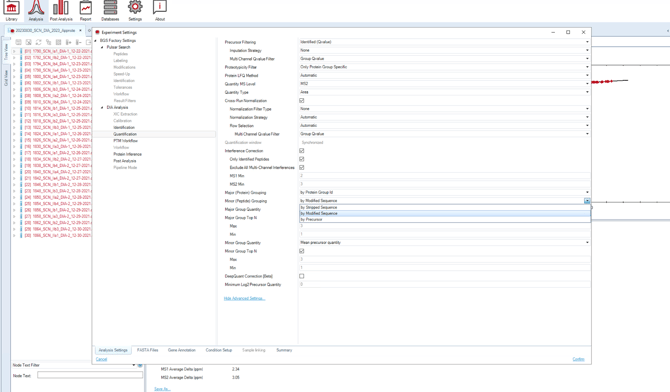
Spectronaut grouping requirement for peptide-level analyses.
Option 1b – Peptide + Protein + PTM Localization Probabilities Schema
Use this schema if you would also like Mass Dynamics to import PTM localization probabilities. Follow the same steps described in Option 1a to set up the correct grouping requirements.
The exported report will include the following precursor-level columns:
- EG.PrecursorId
- EG.PTMLocalizationProbabilities
- EG.TotalQuantity
These additional columns are required because PTM localization probabilities are reported by Spectronaut at the precursor level, rather than the peptide level. Mass Dynamics uses this information to generate PTM tables that include localization probabilities for downstream filtering and visualization.
OPTION 2 - Protein-Only Mass Dynamics Schema
This schema contains the minimal required columns to perform protein-only analysis in Mass Dynamics.
Step to generate the required processed output from Spectronaut:
- Download the Protein-Only Mass Dynamics Schema here.
- Import the Schema to Spectronaut.
- Export the Spectronaut Report.tsv
- Go to the Upload Page in Mass Dynamics, upload the Report.tsv.
OPTION 3 - BGS Normal Report [Not Recommended]
The BGS Normal Report must be generated with the following extra options enabled in the settings: “PG.Genes”, “PEP.Quantity” (see screenshot below; “PG.Description” is optional).
The peptide intensities will be extracted from “PEP.Quantity” which is not by default included in the BGS Normal report.
Step to generate the required processed output from Spectronaut:
- Export the Spectronaut BGS Report.tsv
- Go to the Upload Page in Mass Dynamics, upload the Report.tsv.
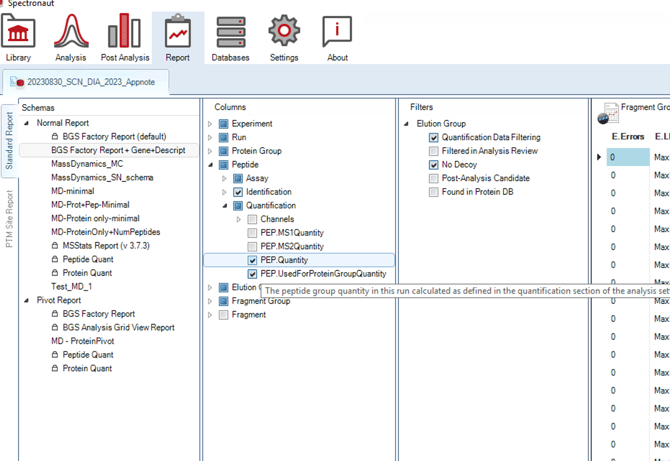
Column requirements to enable peptide-level analysis with the BGS Normal Report
If you need support uploading your data, you can follow these instructions to leverage our assisted upload service.