![MD-logo-circle-alt-colour.png]](https://help.massdynamics.com/hs-fs/hubfs/MD-logo-circle-alt-colour.png?width=40&height=40&name=MD-logo-circle-alt-colour.png)
Supported input data
Mass Dynamics extracts PTMs from the following input formats. The availability of localisation probabilities depends on the input format:
- DIA-NN: Probabilities supported if the parquet file is provided - Learn more about DIA-NN upload.
- Spectronaut: Probabilities supported with the PTM localization schema - Learn more about Spectronaut upload.
- Mass Dynamics Format: Probabilities not currently supported - Learn more about MD Format upload for proteomics data.
Mass Dynamics stores all PTMs internally using UniMod identifiers.
Learn how PTMs are extracted and parsed for each input format in the "How PTMs are extracted" section.
What happens during upload?
When PTMs are detected, Mass Dynamics creates the standard Protein and Peptide datasets together with two additional PTM specific sets of tables.
PTM Sites table
The "PTM Sites" table records every modified peptide (or precursor) identified in each sample.
Each row contains information such as:
- modified peptide sequence
- precursor (when available)
- PTM identity
- localisation probability (when available)
This table represents the PTMs exactly as they were detected in the experimental data.
Learn more about the content of this table in the "PTM Site table details" section.
PTM dataset
Mass Dynamics also creates a PTM dataset consisting of:
- PTM Metadata
- PTM Intensity
To generate these tables, PTMs identified on different modified peptides are rolled up to unique protein modification sites. For example, multiple phosphopeptides containing the same phosphorylation site on a protein are summarised into a single PTM entity.
This dataset is used for downstream statistical analysis.
Learn more about the PTM rollup process in the "PTM rollup workflow" section.
What analyses can I do with PTMs?
Once the PTM dataset has been generated, it can be analysed like any other dataset in Mass Dynamics.
Available workflows for example include:
- Quality control
- Filtering, Normalisation and Imputation. Learn more about PTM specific filtering in the "Filtering PTM dataset" section.
- Pairwise differential analysis and ANOVA
- Dataset tables and Entity lists
- Most of the intensity visualisations module such as violin, box and PCA plots. Learn more about PTM specific visualizations in the "PTM-specific visualizations" section.
Filtering PTM data
PTM datasets can be filtered before downstream analysis. Supported filters include:
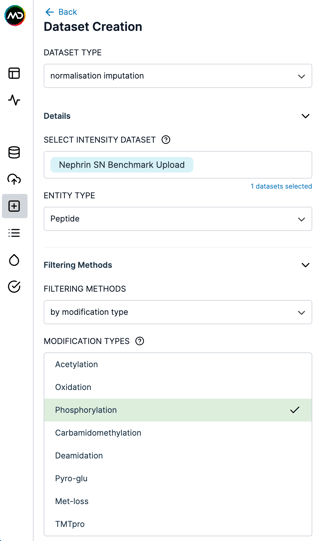
Filter by modification type
Create a new dataset (including intensity and metadata tables) keeping only the selected modification types (see figure below).
This filter is available for both Peptide and PTM datasets.
Filter by localisation probability
When filtering Peptide and PTM datasets, this method keeps peptides and PTMs whose maximum localization probability (PTMProbMax in the PTM sites table) across all samples for a site is above a user defined threshold (see PTM sites table details here).
PTM-specific visualisations
Mass Dynamics provides visualisations specifically designed for PTM data.
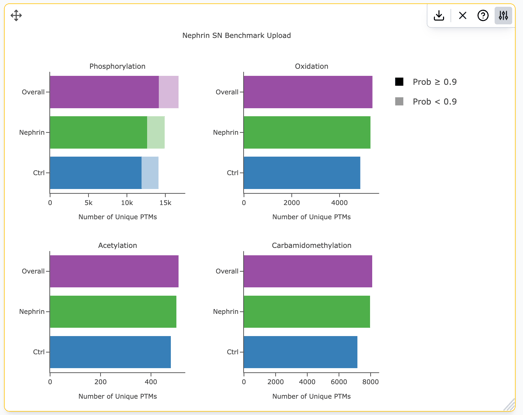
PTM Identifications Barplot
Shows the number of unique PTM sites identified for a selected modification across experimental conditions.
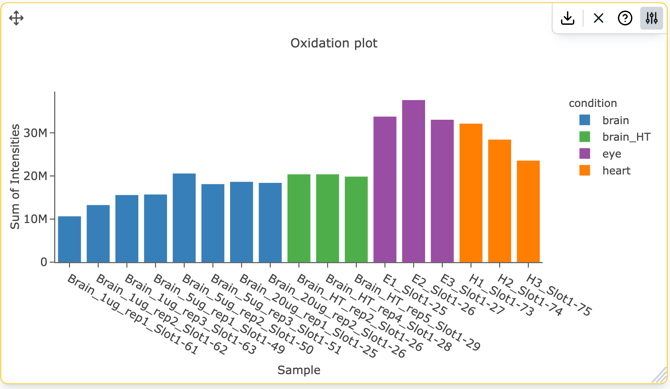
PTM Intensity Barplot
Displays the summed abundance of a selected modification across samples.
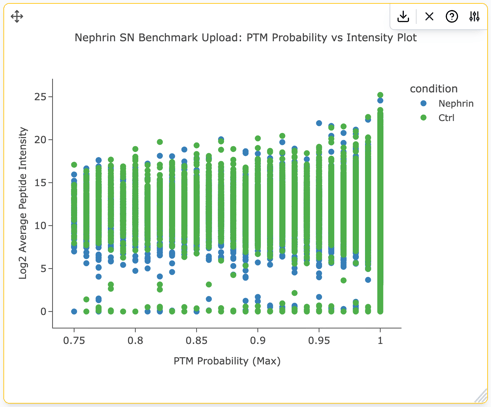
PTM Probability vs Intensity Plot
Visualises localisation confidence together with PTM abundance.
Technical details
How PTMs are extracted
The information available in the PTM dataset depends on the input format used during upload.
DIA-NN
Mass Dynamics extracts PTMs automatically from DIA-NN outputs. Learn more about DIA-NN upload requirements here.
- pg_matrix + pr_matrix: PTMs are extracted from the Modified.Sequence field in the pr_matrix. As localisation probabilities are not available, all PTMs are assigned a localisation probability of 1.
- With the parquet file: PTMs and their localisation probabilities are extracted from the Site Occupancy information. Variable modifications retain their reported localisation probabilities, while fixed modifications are assigned a probability of 1.
For PTM rollup, precursor intensities belonging to the same modified peptide are first summed to generate modified peptide intensities.
Spectronaut
Mass Dynamics extracts PTMs from Spectronaut reports generated using Modified Peptide grouping. Learn more about Spectronaut upload requirements here.
- Spectronaut report without localization probabilities: PTMs are extracted from the modified peptide sequence (GroupingKey column in the report). Localization probabilities are not available, so all PTMs are assigned a localisation probability of 1.
- PTM localization schema: If the report includes the PTM localisation column (EG.PTMLocalizationProbability), localisation probabilities are imported for variable modifications. Fixed modifications are assigned a probability of 1.
Only PTMs present in the modified peptide sequence are retained for downstream analysis.
Mass Dynamics Format
Mass Dynamics Format supports PTM analysis when UniMod identifiers are included in the ModifiedSequence field. Learn more about MD Format upload requirements here.
PTMs are extracted directly from the UniMod codes, and PTM intensity and metadata tables are generated automatically. Localization probabilities are not currently supported in Mass Dynamics Format, so all PTMs are assigned a localisation probability of 1.
PTM Sites table details
The PTM Sites table contains one row for each PTM identified in a sample at the modified peptide or precursor level, depending on the granularity of the input data. This table represents the PTMs exactly as they were detected before they are rolled up to protein modification sites.
The table contains the following columns:
|
Column |
Description |
|
replicate |
Sample or replicate in which the PTM was identified. |
|
PrecursorId |
Precursor identifier (ModifiedSequence + Charge) extracted from the input data. This field is empty if precursor-level information is not available. Modifications are stored as Unimod identifiers. |
|
ModifiedSequence |
Modified peptide sequence extracted from the input data. Modifications are stored as Unimod identifiers. |
|
PTM |
PTM site encoded using the Mass Dynamics standard format: {amino acid}{1-based position}-UNIMOD:{id} (for example, S15-UNIMOD:21 or A0-UNIMOD:1 for an N-terminal modification). |
|
PTMProbPrecursor |
Localisation probability of the PTM on the corresponding precursor. If localisation probabilities are not available, this value is set to 1. This field is empty when precursor-level information is unavailable. |
|
PTMProbSample |
Highest localisation probability observed for the PTM across all precursors identified in the same sample. If localisation probabilities are unavailable, this value is 1. |
|
PTMProbMax |
Highest localisation probability observed for the PTM across all samples in the dataset. If localisation probabilities are unavailable, this value is 1. |
|
PrecursorId_GroupId |
Internal identifier uniquely representing a precursor. This id maps to the GroupId in the Precursor_Metadata and Precursor_Intensity tables, when available for a dataset. |
|
ModifiedPeptide_GroupId |
Internal identifier uniquely representing a modified peptide. This identifier links the PTM Sites table to the corresponding peptide in the Peptide Metadata table. |
PTM rollup workflow
Mass Dynamics performs an automatic rollup from modified peptides to protein modification sites during upload.
The workflow:
- identifies modified peptides
- maps peptide sites to protein coordinates using UniProt
- aligns identical modification sites
- summarises peptide intensities into protein-site intensities
- generates the PTM Metadata and PTM Intensity tables
By default, peptide intensities are summed.
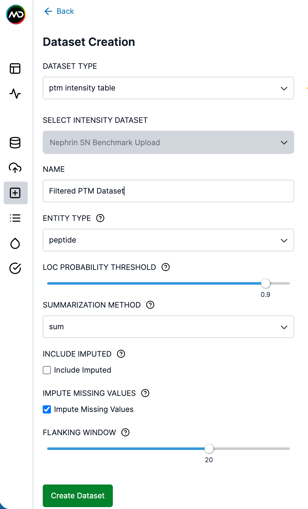
Alternatively, users can rerun the rollup using the PTM Intensity Table dataset to customise:
- modification types included
- localisation probability thresholds
- summarisation method
- additional rollup settings